Your questions answered.
We’re sure you’ve got plenty of questions.
We’ll do our best to answer them for you here.

job offer questions
Congratulations! You’ll receive an email within a few days of your verbal offer (Monday to Friday). The email will include a link for you to log onto our Candidate Portal and accept the offer. You’ll also be asked to complete some onboarding information.
Take a look at the ‘What additional information will you need from me?’ question for details of the onboarding information we’ll need from you.
You should expect to receive your Contract of Employment within a few days of your verbal offer (Monday to Friday). Once received, please accept the terms and conditions as soon as you can.
Don’t hesitate to reach out to your line manager with any queries.
If you spot that a mistake has been made with your personal details, e.g. your name’s spelt incorrectly, you can email [email protected] or call one of the following numbers, depending on your location. They’ll be happy to help.
ROI: 00 353 (0) 1 8839800
NI: 00 44 (0) 2890774799
UK: 00 44 (0) 2033191750
Lines are open from 8.30am to 5pm, Monday to Friday.
If you have questions about your Terms and Conditions, contact your line manager. They’ll liaise with our People Team where necessary.
You’ll be emailed and asked to provide a variety of information as part of our onboarding process, depending on your role. Here are some examples of the information that we ask you to complete on your Candidate Portal:
- Personal details (name, address etc.)
- Bank details
- Emergency contact details
- Reference information
- A medical questionnaire
- Information to help us with our equality and diversity monitoring
- Uniform sizes (if applicable)
In order to consider anyone for a position or hire them, we need to process some personal data. We process this data in line with the General Data Protection Regulation (GDPR). Take a look at our Privacy Notice, or contact our Data Protection Team by email if you have any questions: [email protected]
As an employer, we’ve got to make sure everyone’s eligible to work here (under the Immigration, Asylum and Nationality Act 2006 in the UK and the Employment Permit Acts 2003 and 2006 in the ROI).
This check helps us confirm that anyone we’re considering for a job has the Right to Work in the UK / ROI.
Click here to find out how to prove a Right to Work in the UK.
Click here to find out how to prove a Right to Work in the ROI if the applicant isn’t from a European Economic Area (EEA) country.
If you’re from an EEA country, all that’s needed is a valid ID, like a passport, birth certificate or photo ID, e.g. PPS card, driving licence.
We run Right to Work checks as part of our hiring process, and our hiring managers can do the checks any time using a handy digital app (Experian). The app walks them through the process, so it’s pretty straightforward.
Where interviews are attended in-person, the interviewer quickly takes a picture of the candidate and their Right to Work documents using the app. Applicants get confirmation almost immediately (well, within 15 minutes) if everything checks out.
For online interviews, applicants get an email with instructions on how to download the Experian Candidate RTW app (it’s available on the Apple App Store and Google Play). The email includes a unique link and code for the application.
Top tip – If using the Experian app, make sure you’ve got good Wi-Fi and that the details on your Right to Work documents match what’s on your application.
Reach out to our People Services Team if you have any questions or need additional help. You can email [email protected] or call one of the following numbers, depending on location:
ROI: 00 353 (0) 1 8839800
NI: 00 44 (0) 2890774799
UK: 00 44 (0) 2033191750
Lines are open from 8.30am to 5pm, Monday to Friday.
Due to the nature of some of our roles, you may be required to provide information for a Background Check, e.g. a job working in security or a vulnerable population, etc. If a Background Check is required for your security role, you’ll be asked to submit your five year career history via the Experian Portal link, sent to your email address.
If the role requires a DBS / Garda Vetting check, you’ll be asked to provide identification documents and fill out a form declaring your previous address history, criminal convictions, etc.
One of the most common delays experienced by people who want to join us is when the Background Check process isn’t followed correctly, or there are gaps in the information provided. Get ahead by having all of your documentation to hand and complete the process as soon as you can.
Reach out to your line manager if you need support and complete this step as soon as you can to avoid delays to your start date.
Right to Work verifies that candidates are legally allowed to work in the country. Experian Background Checking screens an individual for a period of five years prior to commencing with Bidvest Noonan. The screening is conducted in line with standard BS7858, PSA (Private Security Authority) and the Children and Vulnerable Persons Act.
Yes, depending on your role and which part of the business you work in.
Once you’ve been offered a role, you’ll be asked to provide additional information about your uniform requirements in our Applicant Tracking System. There’s a uniform size guide to help you select the sizes you need.
Your line manager will be in touch to check size requirements, and will then place the order for your uniform. Get in touch with them if you have any queries.
Your line manager will organise an ID card for you if you need one. They’ll be happy to answer any questions you have.
Your Employee Number, often referred to as your RES ID, will be on the first page of your contract. Alternatively, you can contact you hiring manager, who can let you know what your RES ID is.
You’ll need this number when calling or emailing the People Services Team.
To get in touch, you can email [email protected] or call one of the following numbers, depending on your location:
ROI: 00 353 (0) 1 8839800
NI: 00 44 (0) 2890774799
UK: 00 44 (0) 2033191750
Lines are open Monday to Friday, from 8.30am to 5pm.
Your line manager will send you a virtual Welcome Postcard that includes all of the details you’ll need, including what to wear, where to meet and what to bring with you.
Check your contract for details of your working days and hours. You may be asked to install the Timegate Employee app on your phone (available from the Apple App and Google Play stores).
From here, you’ll be able to check your rosters under the Diary section, and you’ll also be able to view your payslips and book holidays.
Always speak to your line manager before requesting time off.
Holiday requests should be submitted in the Employee Portal/Timegate app (available from the Apple App and Google Play stores).
Add your dates and your request will be sent to your line manager to review. You can check whether your holiday requests have been approved in the Employee Portal/Timegate app.
Once approved, your roster will update to reflect your paid time off. Holidays should be requested in advance of the period you’re expecting to receive payment, to ensure you’re paid correctly and on time.
All colleagues have access to our Benefit Hub. It’s a digital platform where you can grab discounted prices on cinema tickets, car hire, gym membership and eGift Cards from well known retailers, restaurants and supermarkets.
Ask your manager to share the company’s referral code with you. You can sign up by clicking here if you’re in the UK, and here if you’re in the ROI.
Select the ‘Don’t have an account? Sign up‘ option, add the referral code and a few additional details, and you’ll be all set.
We’ll organise for your new laptop to be delivered ahead of your start date, and send you details of information that you’ll need to log on electronically.
Your line manager will share our handy Laptop Set Up Guide with you. It outlines everything you need to know and you’ll be navigating our systems and connecting with colleagues in no time.
If you get stuck, head to NGAGE, our Intranet, where you can search or browse for information. You can even ask Leo, our chatbot for help!
In return, we ask that you take care of your IT equipment and that you follow procedures to keep you, your colleagues, our customers and our business safe.
If you encounter any issues, contact your line manager who will be happy to help.
We’ll organise for your new phone to be delivered ahead of your start date, and send you details of information that you’ll need to log on electronically.
Your line manager will send you a handy Phone Set Up Guide that outlines everything you need to know, including a link to a guide to the work apps that come pre-installed.
If you get stuck, head to NGAGE, our Intranet, where you can search or browse for information. You can even ask Leo, our chatbot for help!
In return, we ask that you take care of your IT equipment and that you follow procedures to keep you, your colleagues, our customers and our business safe.
If you encounter any issues, contact your line manager who will be happy to help.
Sustainability is at the heart of everything we do. We don’t just meet standards, we set them, leading the way in environmental and social responsibility.
We integrate sustainability into every facet of our business, going above and beyond to create safer, healthier communities for the future. Our commitment to reducing our environmental impact is clear – we achieved a 12% carbon reduction in 2024, and we’re not stopping there.
questions about pay
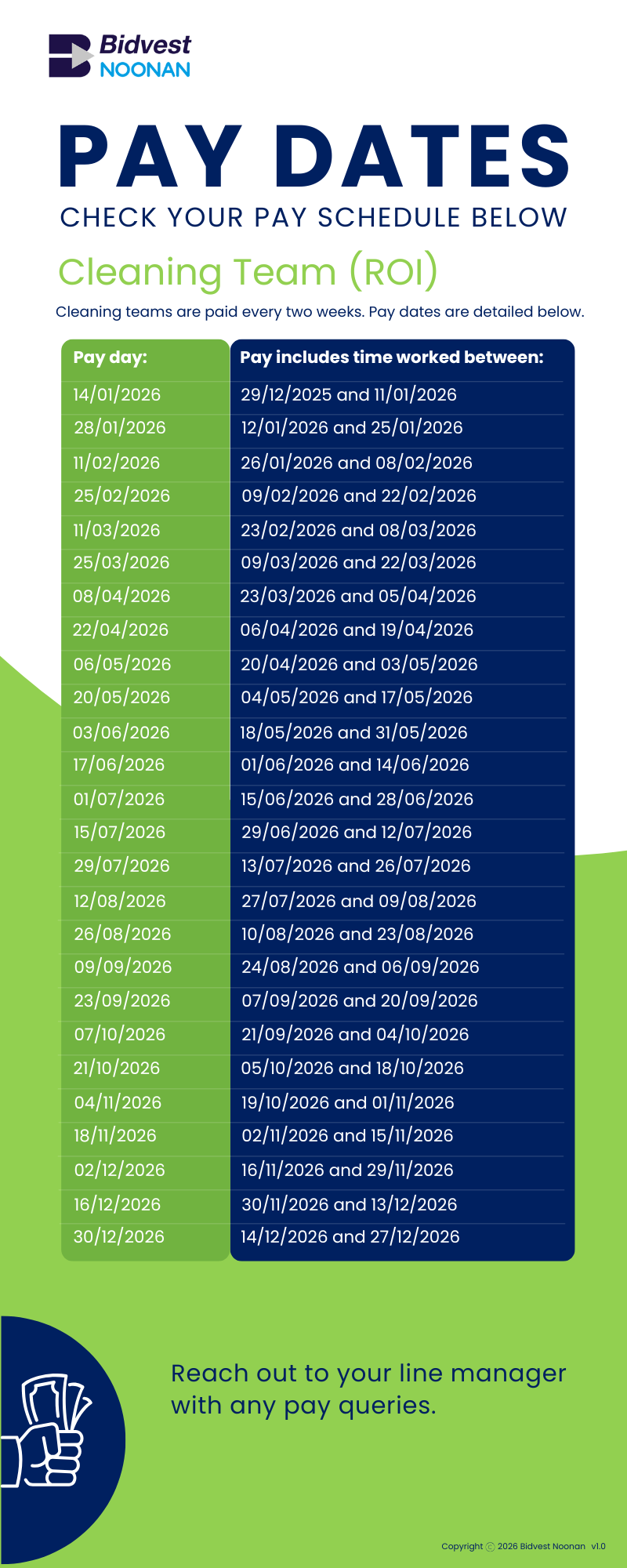
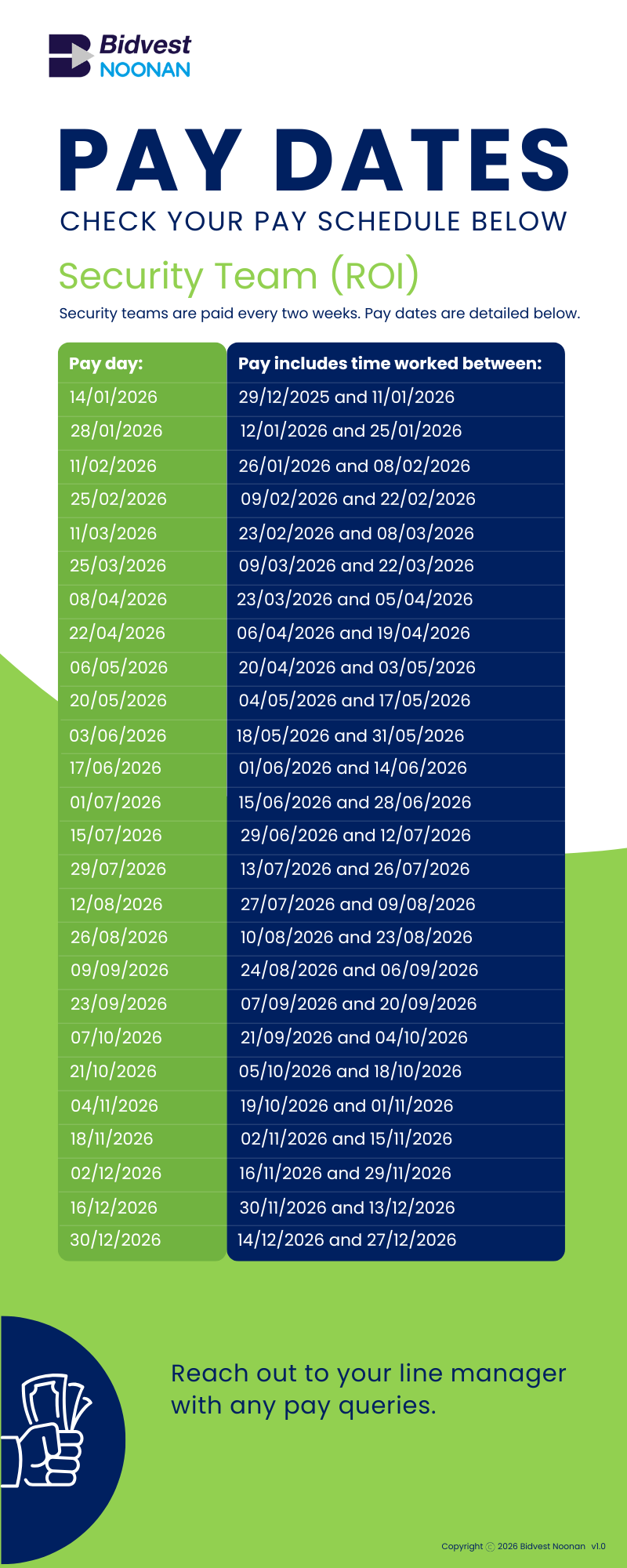
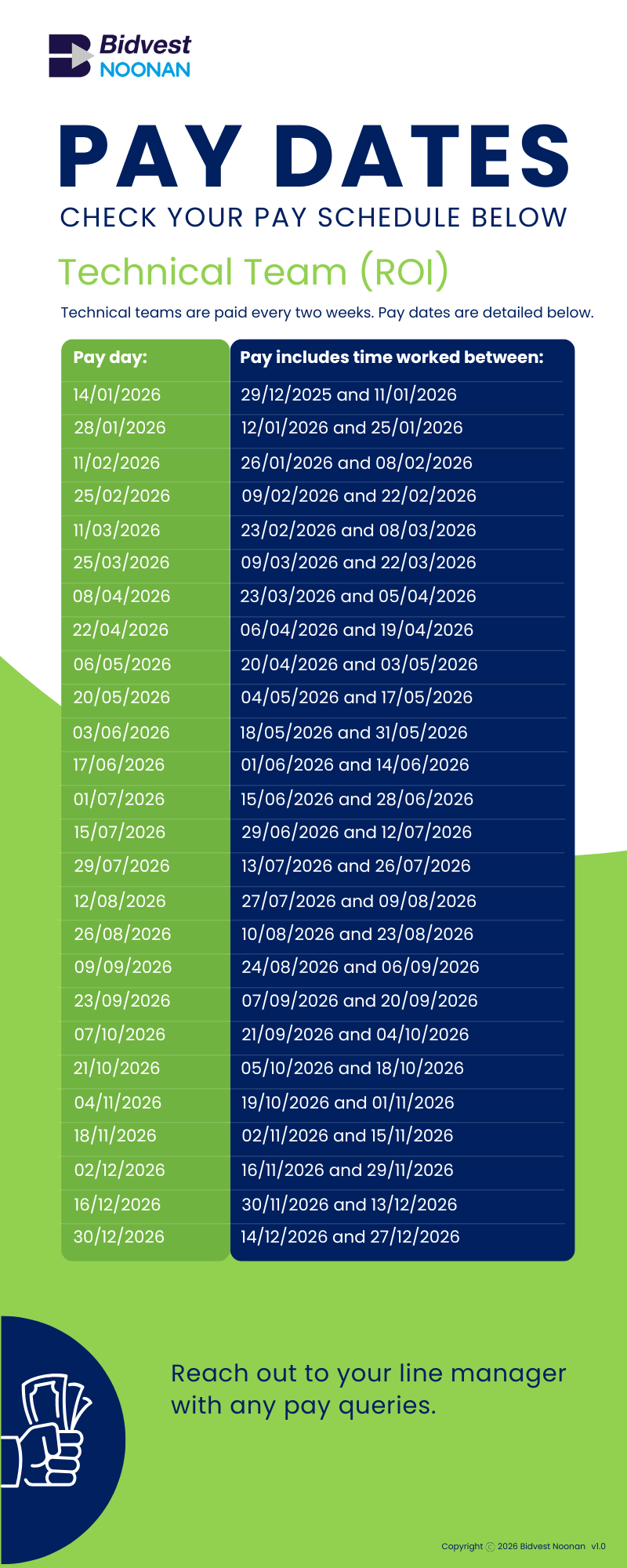
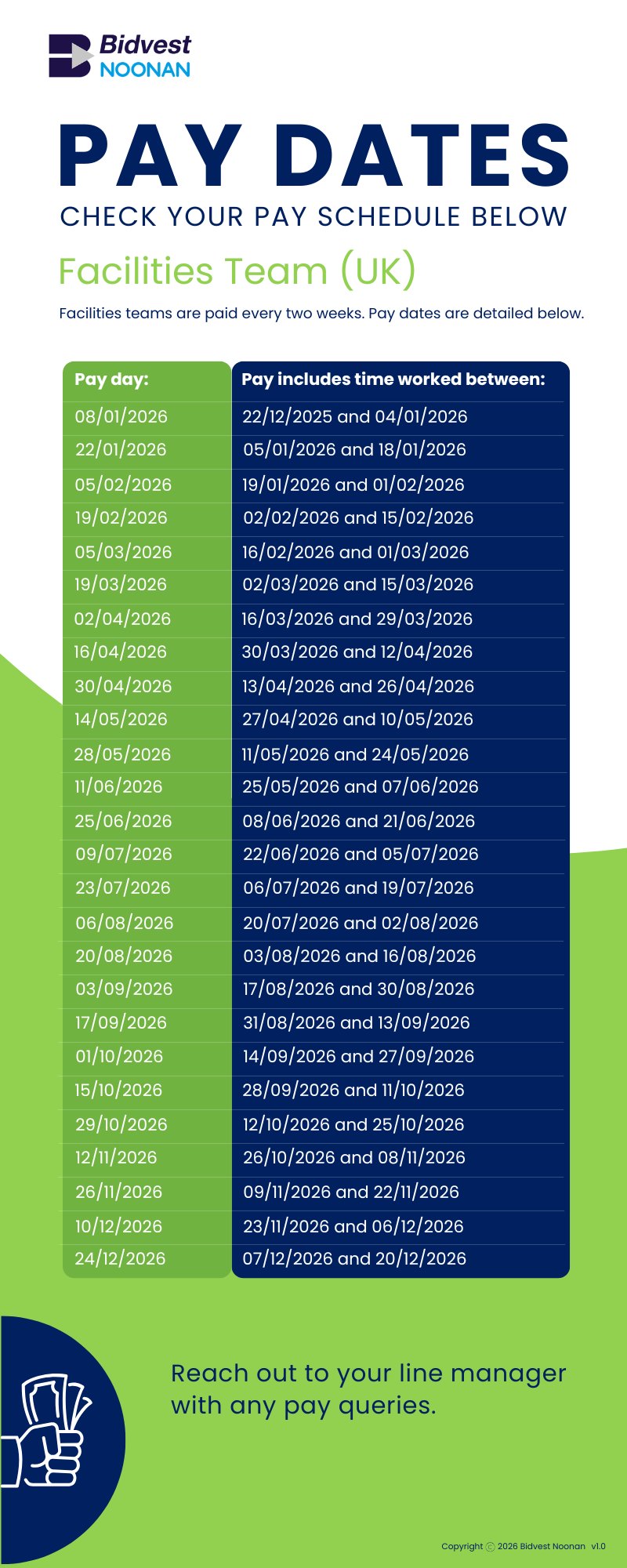
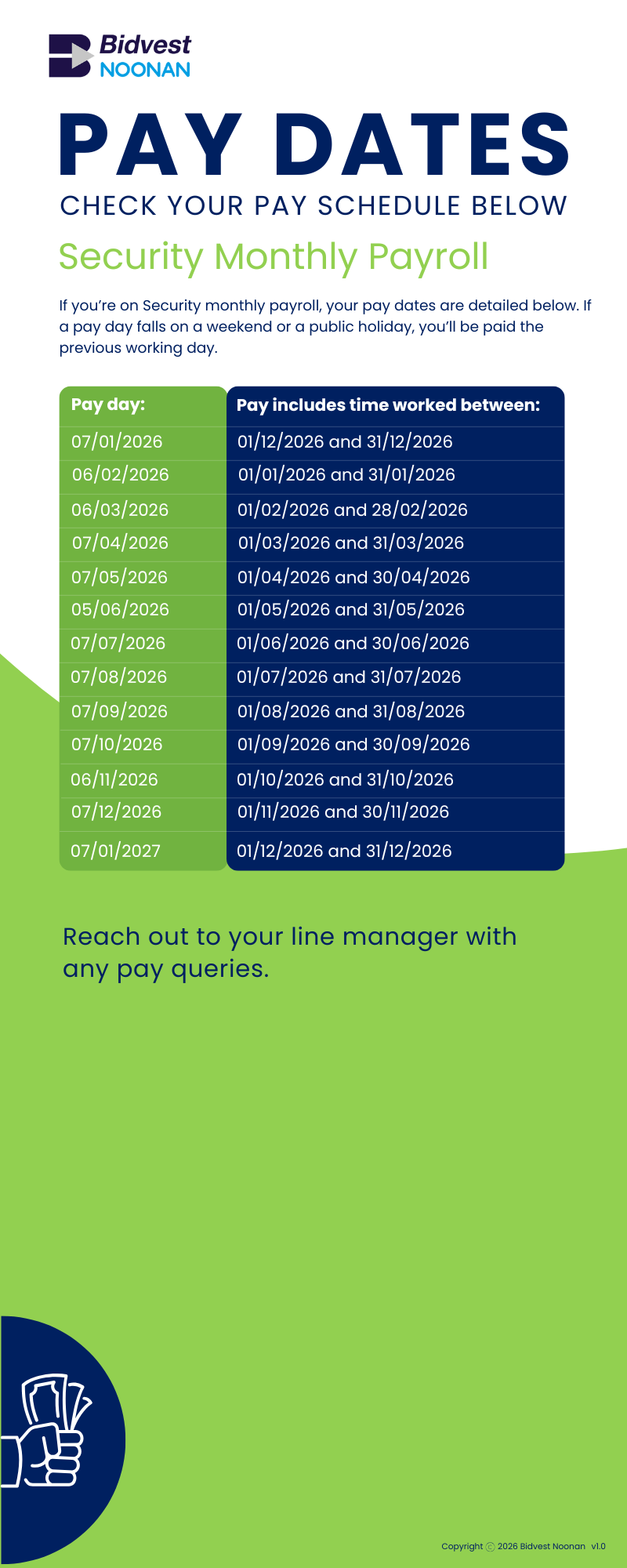
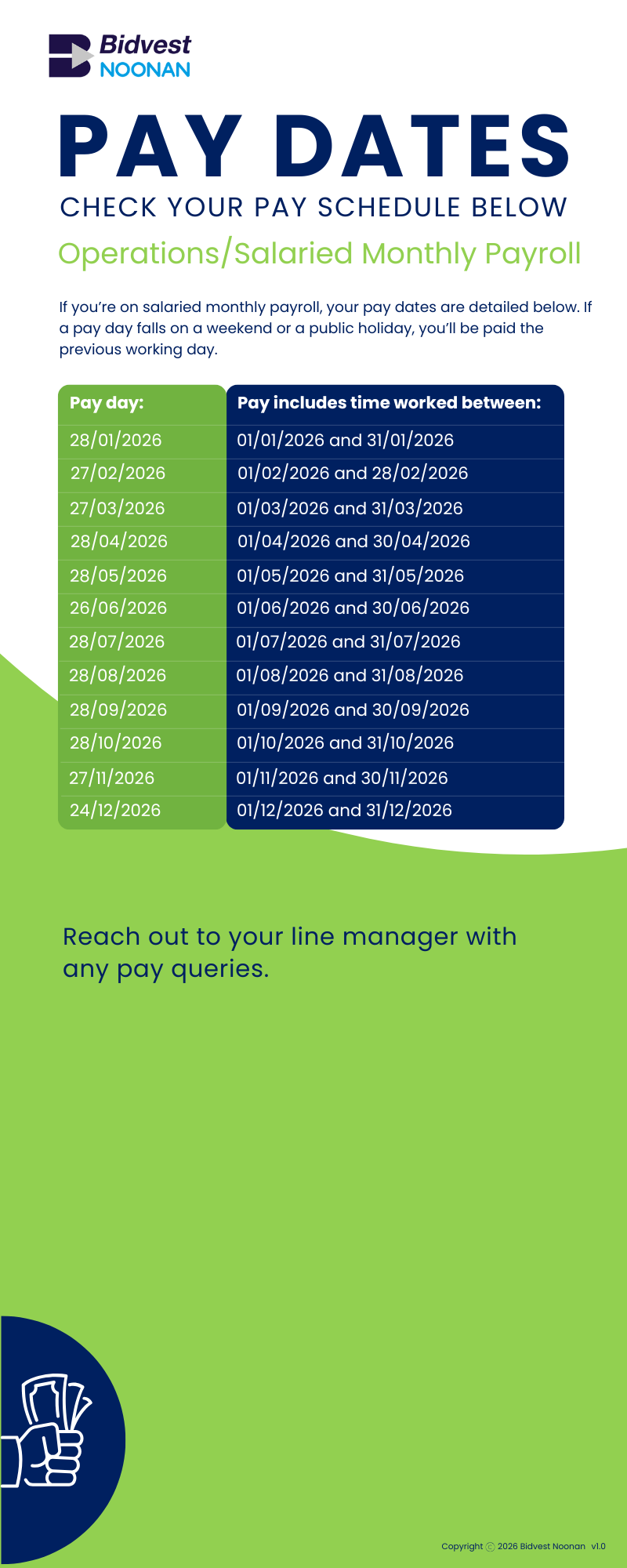
We have a number of different pay schedules depending on your role. Please reach out to your line manager with any queries relating to the pay schedule you’re on.
Take a look below to find the information you need.
We have a number of different pay schedules depending on your role. Please reach out to your line manager with any queries relating to the pay schedule you’re on.
Take a look below to find the information you need.
If you’re in the UK, please email your P45 to [email protected] – the Payroll Specialist Team will update our systems.
If you’re in the ROI, details of your previous earnings will come from Revenue. Once you’re set up on our systems, a notification goes to Revenue and we request an RPN (Tax Credit Certificate). When we receive the RPN, we update our payroll system.
If this is your first employment, contact us by email: [email protected]
If you need access to your payslip (e.g. for proof of earnings), you can access them through your Employee Portal. You can access the Portal on your phone at any time using the log on details that you’ll have received by email to your personal account.
To see your payslips, select Documents and then Payroll Documents.
Payslips are also emailed out on or before your pay date and payslip PINs for new colleagues are emailed out weekly every Friday.
If you forget your PIN or can’t find the email, please email [email protected] and they’ll be happy to help.
If you have any queries about your pay, please contact your line manager in the first instance.
Any requests for additional payments or deductions need to be sent to Payroll from your line manager.
If you’re in the UK, your P60 will be emailed out to you before the end of May each year.
If you’re in the ROI, please log into My Account Revenue, where you can request a Statement of Earnings.
We’ll email your P45 to the email address we hold on our system. It will also be loaded to your Employee Portal, where you’ll be able to access it for a month after your leave date.
The ROI no longer issue P45s. Your leave date will be submitted to Revenue, along with your final payroll submission.
If you need additional support, you can email us on [email protected] or call one of the following numbers, depending on your location:
ROI: 00 353 (0) 1 8839800
NI: 00 44 (0) 2890774799
UK: 00 44 (0) 2033191750
Lines are open from 8.30am to 5pm, Monday to Friday.
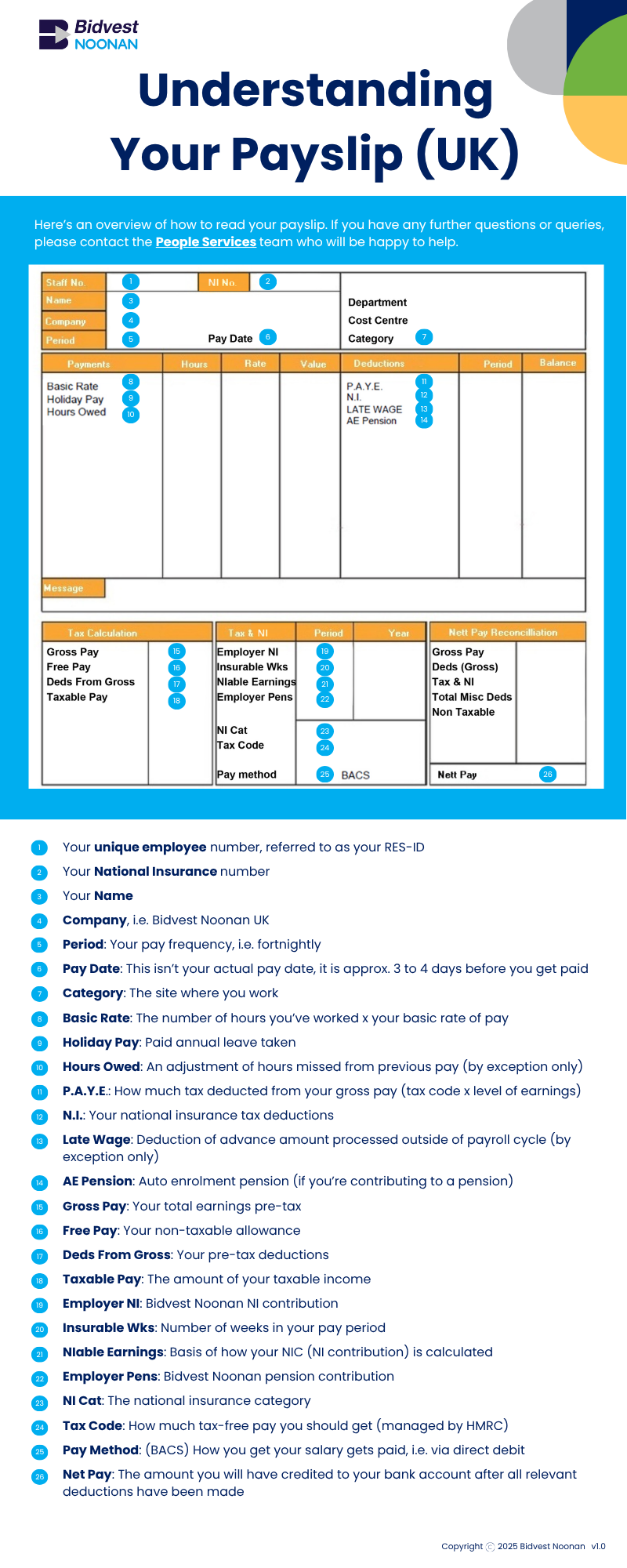
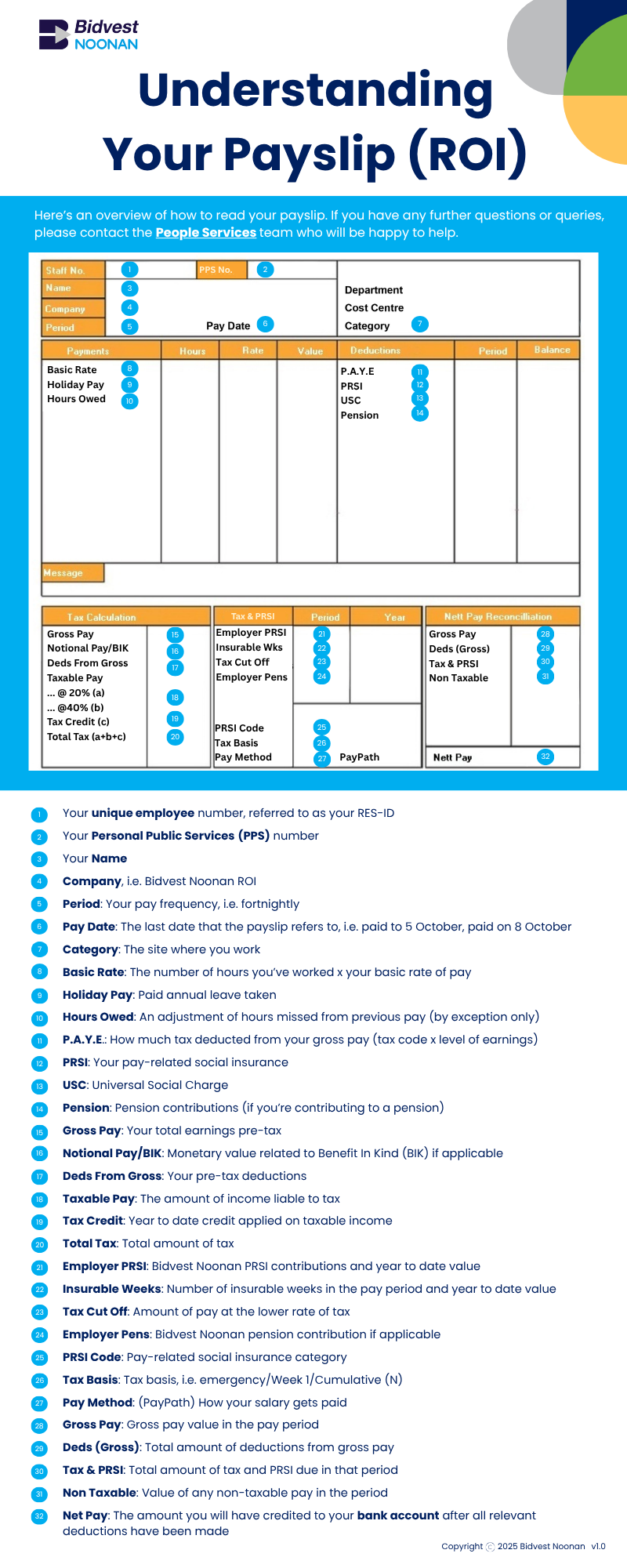
Click the relevant option below for a guide to Understanding Your Payslip.
If you still have queries, email [email protected], or call the team on the numbers below and they’ll be happy to help.
ROI: 00 353 (0) 1 8839800
NI: 00 44 (0) 2890774799
UK: 00 44 (0) 2033191750
Lines are open from 8.30am to 5pm, Monday to Friday.
questions about TUPE
TUPE stands for Transfer of Undertakings (Protection of Employment) Regulations 2006. It’s a legal framework designed to protect employees when the business they work for transfers to a new owner or service provider.
If you’re joining Bidvest Noonan through TUPE
You’ll be issued a digital Welcome Pack via e-mail which has lots of information to help you prepare for your transfer to Bidvest Noonan. We’ll hold consultation meetings to answer any questions you might have and guide you through the final steps of the transfer process.
If you’re leaving us through TUPE
You’ll receive information via email regarding the transfer and how this will impact you. You will have the opportunity to ask any questions or any concerns you may have throughout the process.
Redundancy isn’t an option in this situation, as it’s not considered a redundancy scenario. Your role is continuing, just under a new employer, Bidvest Noonan. This means your employment will transfer over, and you’ll have the opportunity to stay in work without any break in service.
While we hope you’ll choose to transfer, the decision is ultimately yours. If you decide not to transfer, the law treats this as a resignation from your current role. Before making a final decision, we strongly recommend speaking with your current employer to discuss your options and any implications.
Under TUPE regulations, your existing terms and conditions will transfer with you to Bidvest Noonan. We’ll work with your employer to gather this information, and go through it with you during consultation meetings to make sure everything is accurate and clear.
Absolutely. As a leading provider of facilities services and solutions, Bidvest Noonan offers a wide range of opportunities for career growth. With the scale of our business and a strong focus on training and development, we’re committed to helping our colleagues build rewarding careers and progress within the organisation.
We’ll be holding consultation meetings ahead of the transfer date, and you’ll have the chance to raise any questions or concerns during those sessions. We’ll confirm the details of these meetings closer to the time, so you’ll know when and where they’ll be.
Your wages will be paid by bank transfer. We’ll go over your pay dates and any other payroll details during your Welcome Meetings, so you’ll know exactly what to expect.
Any annual leave you’ve accrued but haven’t yet taken will transfer with you as part of the TUPE process. This includes any holiday you’ve already booked and had approved by your current employer. During the consultation meetings, it’s important to confirm the details of any leave you’ve arranged so we can make sure everything carries over correctly.
Yes, uniforms will be provided where required. We ask that they’re worn as part of your role and kept in good condition throughout your employment.
We’ll be holding consultation meetings to answer any questions you may have and to finalise the transfer process. Meeting details will be shared with you closer to the time.
Questions about Pensions
You can email [email protected] or call one of the following numbers, depending on your location:
ROI: 00 353 (0) 1 8839800
NI: 00 44 (0) 2890774799
UK: 00 44 (0) 2033191750
In the subject field of your email, include that it’s a pension query and your employee number (referred to as your RES ID). This will help the Pension and Benefits team look into your query as quickly as possible.
Send details of additional contributions that you’d like to make in an email to [email protected].
In the subject field of your email, include that it’s a pension query and your employee number (referred to as your RES ID).
Explain in the email that you’d like to make additional voluntary contributions (AVCs) to your pension and the amount you’d like to contribute. If you know the name of your scheme, please include this. The information will help the Pension and Benefits team look into your query as quickly as possible.
Take a look at the infographic below if you’re in the UK. We have our own site that’s dedicated to our UK Pension Scheme. It’s packed with useful information; take a look here. To find out more about auto-enrolment, click here. You can also find out more about workplace pensions and their benefits here.
If you’re in the ROI, take a look at Irish Life’s PRSA Personal Retirement Savings Account webpage.
In the UK, colleagues are enrolled to our workplace pension scheme with The People’s Pension, administered via People Partnership. You can learn more about your pension and how your funds are invested by visiting our dedicated Pension Microsite.
To opt out of the UK pension scheme, you will need to wait until you receive your Welcome Pack from The People’s Pension, which includes your Customer Reference Number. This is usually sent via email or post (based on the communication preference you provided) within 30 days of enrolment.
Once received, please visit the Opt Out Portal mentioned in your Welcome Pack. Enter your Customer Number, NationaI Insurance (NI) Number and confirm, ‘I would like to opt out’. We will then be notified of your decision, and your pension record will be updated accordingly.
Please note:
- The opt out window is open between day 30 and day 60 from your enrolment date.
- If you successfully opt out within this timeframe, any pension contributions already deducted will be refunded through your payroll after the next monthly submission (typically after the 22nd of the following month).
We will contact our pension provider to request a reissue of your Welcome Pack, which includes your customer number. Please email [email protected] and confirm that the email address you used to raise the ticket is your preferred email address for receiving the Welcome Pack. Once confirmed, we’ll arrange for this to be resent.
Know Someone who might want to join us?
We’re so happy that others are interested in joining us. Advise them to take a look at our Careers Page, where they’ll find a link to all of our current vacancies. Why not encourage them to follow us on our socials?
Everything’s done digitally, so they’ll need to find a role that they’re interested in and click the Apply button.
Then all they need to do is set up their profile, upload their CV and click Register.
When applying for a role, they’ll set up an account on our Applicant Tracking System (ATS), ePloy. This is where they register and upload their CV. Profiles can updated at any time, and it’s possible to track the status of applications and see details about upcoming interviews.
In order to consider anyone for a position or hire them, we need to process some personal data. We process this data in line with the General Data Protection Regulation (GDPR). We have a Privacy Notice and our Data Protection Team can be contacted by email with any questions: [email protected]
As an employer, we’ve got to make sure everyone’s eligible to work here (under the Immigration, Asylum and Nationality Act 2006 in the UK and the Employment Permit Acts 2003 and 2006 in the ROI).
This check helps us confirm that anyone we’re considering for a job has the Right to Work in the UK / ROI.
Click here to find out how to prove a Right to Work in the UK.
Click here to find out how to prove a Right to Work in the ROI if the applicant isn’t from a European Economic Area (EEA) country.
If the applicant is from an EEA country, all that’s needed is a valid ID, like a passport, birth certificate or photo ID, e.g. PPS card, driving licence.
We run Right to Work checks as part of our hiring process, and our hiring managers can do the checks any time using a handy digital app. The app walks them through the process, so it’s pretty straightforward.
Where interviews are attended in-person, the interviewer will quickly take a picture of the candidate and their Right to Work documents using the app. Applicants get confirmation almost immediately (well, within 15 minutes) if everything checks out.
For online interviews, applicants get an email with instructions on how to download the Experian Candidate RTW app (it’s available on the Apple App Store and Google Play). The email will include a unique link and code for the application.
Top tip – If candidates are using the Experian app, make sure they’ve got good Wi-Fi and that the details on their Right to Work documents match what’s on their application.
They should reach out to our People Services Team if they have any questions or need additional help. They can email [email protected] or call one of the following numbers, depending on location:
ROI: 00 353 (0) 1 8839800
NI: 00 44 (0) 2890774799
UK: 00 44 (0) 2033191750
Lines are open from 8.30am to 5pm, Monday to Friday.
The Candidate Right to Work app is only available in the UK. In the Republic of Ireland, employers must see and verify original proof documentation. Therefore, all Right to Work checks are carried out face to face, and submitted via the Experian Right to Work Recruiter app by the hiring manager.
If there’s an issue with the Right to Work check, this will be escalated to our People Specialist Team. The check and proof documentation will be carefully reviewed by a member of the team.
If there’s anything missing or outstanding, the check can be rejected back to the hiring manager with guidance for required action. If the check can be approved by the People Specialist team, they have the ability to override the error.
Yes, depending on which role and in which part of the business they’ve applied to work in, they may be required to complete Background Checking, and/or Garda vetting.
We work in environments with children, young people and vulnerable adults and we are required by law to ensure that all screening is conducted according to relevant standards.
In the UK, we screen under standard BS7858. In the ROI, we screen as per PSA (Private Security Authority), and the National Vetting Bureau (Garda Criminal Record Checks).
Candidates will receive an email from Experian inviting them to click on a link where they will complete their background check application form. Here, they will capture relevant personal details, employment history and any gaps in employment.
Right to Work verifies that candidates are legally allowed to work in the country. Background Checking screens an individual for a period of five years prior to commencing with Bidvest Noonan. The screening is conducted in line with standard BS7858, PSA (Private Security Authority) and the Children and Vulnerable Persons Act.
Questions about The Employee Assistance Programme
An Employee Assistance Programme (EAP) is a free, confidential service that gives you access to support when you need it – whether you’re dealing with something personal, work-related, or just need someone to talk to.
It includes things like counselling, legal or financial advice and wellbeing resources, all designed to help you feel your best in and out of work.
All Bidvest Noonan colleagues have access to the EAP benefit.
Vivup are our EAP provider. They are a leading employee benefits provider and specialise in health and wellbeing.

Our Employee Assistance Programme provides information and practical support on a wide range of issues experienced at work and home, including but not limited to:
- Stress
- Family Difficulties
- Relationship Issues
- Health Concerns
- Finances
- Bereavement
- Anxiety
- Depression
- Workplace Issues
- Trauma
You’ll need the below information to hand when you make contact:
- Full name and phone number
- Confirmation that you work for Bidvest Noonan
- What support service you’re looking for (e.g. You may want to request information or advice if you need support with issues such as childcare, finances, debt or legal information. You may want to request emotional support for issues such as stress, anxiety, trauma or mental wellbeing)
- If you’re currently receiving any support from your GP, Mental Health Services, etc. then have these details to hand
A member of the EAP team will outline the confidentiality policy, take your personal details and ask you a set of questions. This enables the service to triage your call to best support you and ensure you’re provided with the most appropriate support pathway.
They’ll then look to immediately book you in with one of their counsellors / psychotherapists for an initial session to see how they can assist. If you would like access to advice, in the moment support, or information, the team will offer this at point of contact for a counsellor to call back that day.
- APPTS Accredited: The highest level of clinical approval in the UK
- Directors sit on the APPTS accreditation committee and APPTS board
- A minimum of 3-year post qualification
- Minimum qualification level of postgraduate qualification of BACP, UKCP and BABCP
- Adherence to ethical guidelines of The Employee Assistance Professional Association
Yes, the service you receive is confidential.
There are, however, some circumstances where the Counsellors may need to provide information to a third party, which could include Bidvest Noonan, as your employer. These situations are detailed as follows:
- Where there is immediate and / or serious risk of harm to yourself or others.
- A situation regarding the abuse of a child.
- A court order for disclosure of information.
- Whereby you have given written consent in writing, to disclose specific information to a named third party (for example your GP, Occupational Health department. etc.)
- A requirement of the law, e.g. a contravention of the Drug Trafficking Act (not possession), or the Prevention of Terrorism or Money Laundering Acts.
- A Safeguarding issue where there is a threat to yourself, another, or a child protection issue.
Vivup always endeavour, if possible, to discuss any such disclosure of information with you beforehand, and to do this with your consent.
Your initial appointment will be offered within five working days. This is subject to your own availability and the service always strives to accommodate any days, times, therapist gender and language requirements that you may have.
Not everyone requires access to structured counselling, and you may find that the in the moment support you receive on the day, or relevant signposting or access to psychoeducation materials may be the most useful to you at that time.
You can make a comment, or complaint, any time during your contact with the service. You can call the 24/7 number and speak to a member of the Client Services team, or ask to speak to one of the senior clinical team.
- UK 24/7 EAP helpline: 0330 380 2157
- ROI 24/7 EAP helpline: 1800 911 700
Yes. You can make a subject access request (SARS). The service will review your request in line with their SAR’s processes and provide these to you via a delivery method of your choice.
You’ll be asked for your personal information to enable the EAP service to provide you with access to their support service and to collate non-identifying management information. For those accessing their Counselling services, CORE-Net is Vivup’s secure clinical management system. All counsellors keep brief notes of sessions to maintain professional standards of care.
These notes are treated as confidential, stored securely in line with all applicable Data Protection laws including UK GDPR, DPA 2018 and EU GDPR and are destroyed confidentially. Notes and client details are stored within a secure dual identification clinical management system that complies with all applicable Data Protection laws.
The notes are stored by numerical code and are non-identifying. Notes can only be accessed by those with the authority to do so. Under the terms of all applicable Data Protection laws including the Data Protection Act 2018 (UK and Northern Ireland), UK GDPR, Data Protection Act 2018 (Republic of Ireland) and EU GDPR you must give your informed consent to such records being made and retained. It is your right not to consent, but in such cases, Vivup are unable to provide counselling.
No. Whilst they will ask you about any medication that you’re currently taking, the counsellors and psychotherapists are not medically qualified to give pharmaceutical advice or prescribe medication. It’s best to consult your GP if you have any questions about your medication.
The service number is available 24/7, however you will not be able to have contact with your allocated counsellor, though the team is available and will provide in the moment support.
If you are experiencing a mental health crisis and need urgent support, call 999 or contact your local A&E emergency department.
You can also contact:
Name of Organisation 15698_b32286-aa> | Contact Details 15698_c6291b-5b> |
|---|---|
NHS non-emergency 15698_c36f39-1e> | 111 15698_350b89-ee> |
HOPEline UK | 0800 068 41 41 15698_f557f4-14> |
SANE | 0300 304 7000 |
CALM | 0800 58 58 58 |
Samaritans 15698_12e45e-0e> | 116 123 |
Mind Out | 15698_dc6c9c-e5> |
Contacts
The People Services Team are available to support with queries relating to HR and payroll. This includes questions about pensions, benefits and pay.

You can email [email protected] or call one of the following numbers, depending on your location:
ROI: 00 353 (0) 1 8839800
NI: 00 44 (0) 2890774799
UK: 00 44 (0) 2033191750
Lines are open from 8.30am to 5pm, Monday to Friday.